DIGITAL SIGNAGE · VIDEO WALLS · PROJECTION
Digital Media Walls in Mississauga & the GTA
Make your content part of the space with digital media walls from MYC Graphics. We help businesses in Mississauga, Toronto and the GTA plan display features for branded video, promotions, menus and information.
Share your location, content goals and available space. We can review the display approach, visual content and installation requirements as a coordinated project.
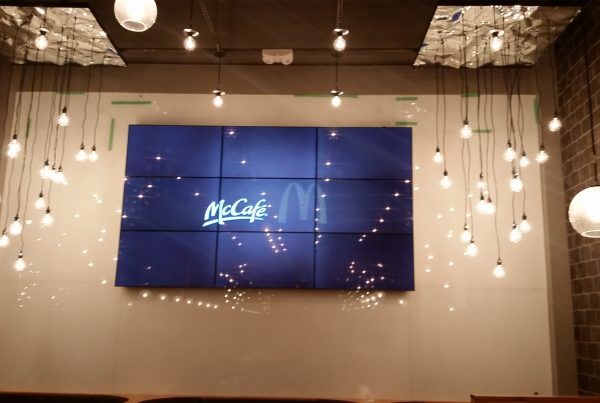
A tiled video wall integrated into a commercial hospitality interior.
Start with What the Display Needs to Communicate
A successful digital display starts with a clear purpose. It may need to introduce your brand in a reception area, communicate a promotion in a store or present video within a restaurant or event space.
Consider who will see the content, how far away they will be and how long they are likely to look. These details help guide the screen arrangement, content layout and display position before equipment is selected.
Digital Signage
Use a display or coordinated group of displays to share messages that change over time. Review the content schedule and who will be responsible for updates.
Video Walls
Plan multiple panels or modules as a coordinated viewing area. The selected technology, panel arrangement and playback setup affect the overall appearance.
Rear Projection Film
Discuss projection onto a suitable glass or acrylic surface. The projector position, ambient light and available space behind the surface need to be reviewed.
Digital Display and Installation Examples
These existing project photos show a display in its commercial setting and work on a projection surface. Each project needs its own equipment, mounting and content plan.

A video wall positioned within a hospitality venue’s seating area.
Installation work on a glass projection surface.
Choose the Display Around the Room
Available wall area is only one part of the brief. Viewing distance, sightlines, ambient light and surrounding finishes all influence the result. Include photographs of the complete area and the main approach so the installation can be considered in context.
Review the differences between display technologies before selecting a system. Tiled LCD arrangements can show bezel lines, and the artwork should account for panel boundaries. If you are considering a different display format, explore LED displays as part of the comparison.
Useful Site Details
- Display area dimensions
- Viewing distance and angles
- Room lighting and reflections
- Wall and mounting conditions
- Power and cable locations
- Service access and operating hours
Plan the Content and Update Workflow
A display needs content prepared for its actual layout. Confirm the final resolution, aspect ratio and supported formats before exporting graphics or video. Text should be readable from the intended viewing position, and important details should be placed with panel boundaries in mind.
Decide how updates will be managed: who creates the files, who approves them and who publishes them to the selected playback system. Software features, remote access and any recurring costs depend on the chosen setup and should be confirmed in the scope.
Our graphic design services can help coordinate the visual treatment with your display signage and surrounding brand materials.
From Display Brief to Installation
- Define the purpose. Share the audience, location, intended content and required date.
- Review the display approach. Discuss the layout, equipment and content-management requirements.
- Confirm the site details. Review mounting, cable routing, power and access with the relevant project team.
- Prepare content and handover. Confirm playback requirements, update responsibilities and the included setup or training.
Installation and commissioning requirements vary by system. Confirm responsibilities, included services and scheduling in your quotation. Learn more about our sign and graphic installation services.
Digital Media Wall FAQs
What is a digital media wall?
A digital media wall is a display installation used to present branded graphics, video or information in a commercial space. The term can cover different screen arrangements, so the display type, content and control requirements should be defined for your project.
What is the difference between digital signage and a video wall?
Digital signage can use a single screen or several displays to communicate information. A video wall uses multiple display panels or modules as a coordinated viewing area. The layout and playback system determine how content is arranged across it.
Will a video wall look like one uninterrupted screen?
That depends on the display technology and layout. Tiled LCD panels can have visible bezel lines, while other systems have different characteristics. Review the proposed system and content treatment rather than assuming every video wall has the same appearance.
What content can the displays show?
Content can include branded graphics, video, promotions, menus and other information supported by the selected playback system. Confirm file formats, resolution, aspect ratio and playback requirements before preparing the final content.
Can we update the content ourselves?
Content updates depend on the selected player, software, access permissions and network setup. Tell us who will manage the displays and how often updates are needed so the workflow, training and any software costs can be discussed.
Is rear projection film suitable for every window?
Suitability depends on the surface, projection space, ambient light and viewing conditions. Rear projection needs a compatible projector and an appropriate position behind the projection surface. The actual location should be reviewed before specifying a system.
Can you help with installation?
Installation requirements can be reviewed as part of the project scope. Mounting surfaces, access, cable routes, power, ventilation and service access need to be considered. Confirm which installation and coordination services are included in your quotation.
What do you need to quote a digital media wall?
Send the project location, site photographs, available display dimensions and approximate viewing distance. Include your intended content, operating hours, update workflow, desired date and any existing equipment. Pricing depends on the confirmed hardware, software, content and installation scope.
Let’s Discuss Your Digital Display Project
Send MYC Graphics your site photos, display dimensions and content goals. We can review the options for your business in Mississauga, Toronto or the GTA.
Or call 416-907-9491.